There are two ways your team signs in to the POS. Shared PIN is the default.
| Shared PIN | Personal PIN | |
|---|---|---|
| Signing in | One PIN for the whole team | Each person has their own |
| Sales and orders | Not tracked per person | Attributed to each person, and filterable |
| Staff list | The administrator plus one shared identity | Each staff member listed individually |
| Permissions | Applied to the shared identity | Set per person, with reusable presets |
| Punch in / out | Add employees manually | Automatic when they sign in |
Shared PIN suits a small team where knowing who entered what isn't worth the friction. Personal PIN is what you want for per-server sales, individual permissions, or timesheets that look after themselves.
Switching modes
Settings → General Settings → Staff → PIN Assignment. Only an Administrator can change this.
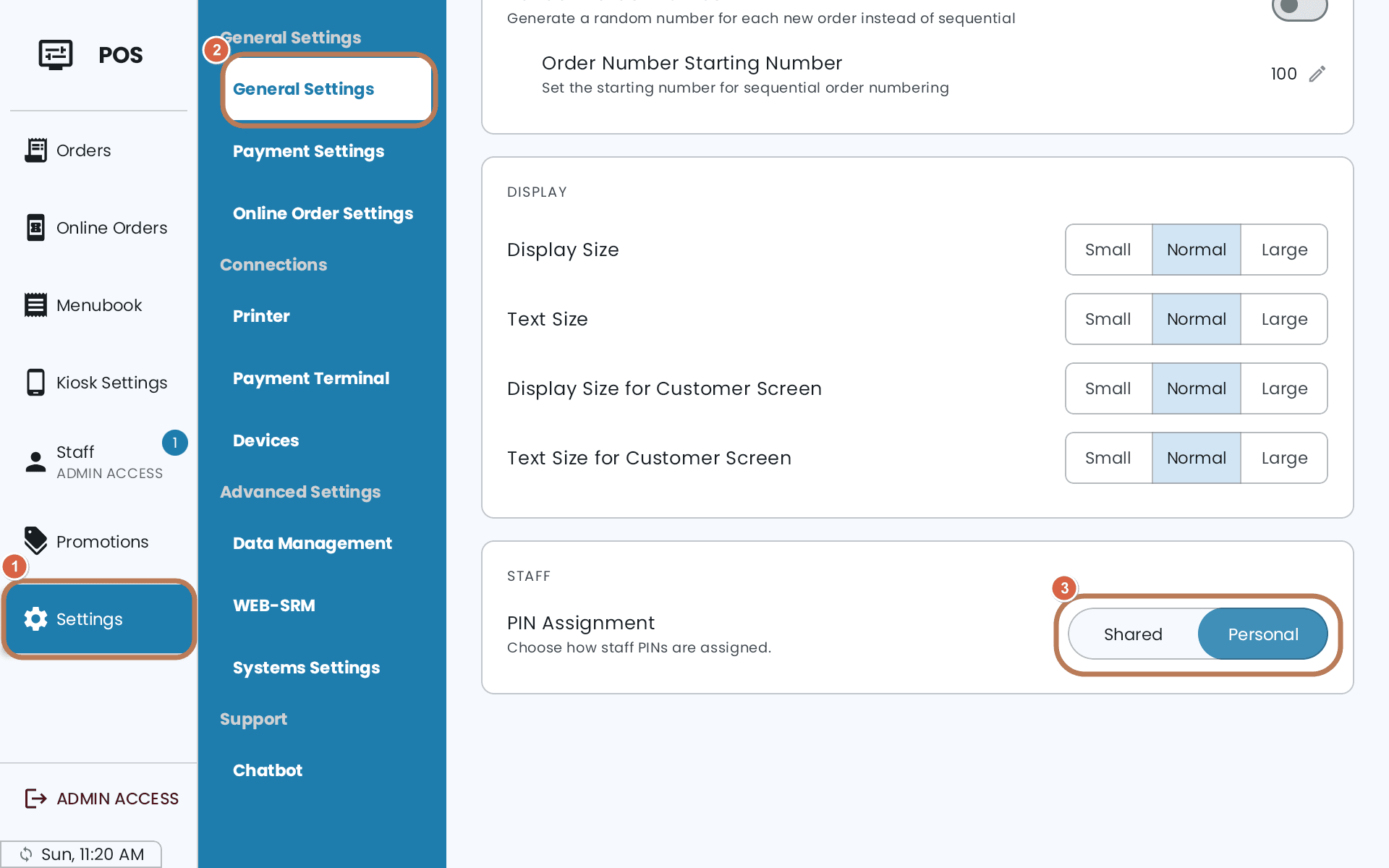
Switching from Personal back to Shared cannot be undone. All staff PINs are reset and table assignments are cleared. The Administrator PIN is kept — that is the one thing that survives, so you can still get back in. Every other PIN has to be issued again.
Going the other way, Shared → Personal, is the safe direction. If you are unsure which you want, start on Shared.
After either switch everyone is signed out. Going to Shared, the POS asks you to sign in again; going to Personal, it asks for an admin account specifically.
In Quebec, Personal PIN also gives each staff member their own WEB-SRM user, created when you add them. A warning on the Staff tab means someone is missing one — see What WEB-SRM means for you.
Staff changes made on one POS reach your other devices when they next update — a POS that is offline keeps the PINs and permissions it last knew until it reconnects.
Your PINs
A staff PIN is four digits, and no two staff can share one — the POS refuses with "This PIN is already in use". Anyone can change their own PIN without needing any permission; changing someone else's needs the Edit Staff permission.
The PIN lock screen appears when the app starts and after an hour of inactivity. To go back to it yourself, tap your name at the bottom of the menu on the left. With Personal PIN, that hands the POS to the next person; with Shared PIN, it ends the session.
Master PIN and Master Password
Separately from staff PINs, two credentials sit above them, and both work in either mode:
- The Master PIN authorises a single gated action on the spot — a cart-wise discount is the one you'll meet most often. It's an Administrator's PIN: any admin types theirs to let that one action through without changing the person's permissions.
- The Master Password is a separate credential for editing an Administrator account, and it is checked online — the POS needs an internet connection to accept it.