Menu Library → Settings → Translations is a spreadsheet of every name on your menu, with a column per language. It beats opening items one at a time.
Two languages
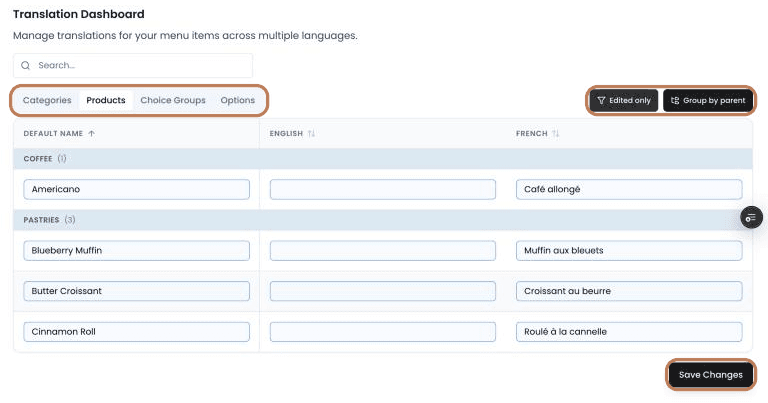
English and French. That's it. The spreadsheet's columns are Default Name, English and French.
Korean isn't supported for menu items. A Korean-speaking customer on your kiosk or online store sees each item's default name. The rest of the interface is translated; the menu items aren't, and there's no way to add them.
Save as you go
There are four tabs — Categories, Products, Choice Groups and Options — and the save is per-tab. Click Save Changes before you move to another one.
Working through it
Search filters by item name — note it searches the default name, not the translations. Edited only hides everything you haven't touched, which is the way to review before saving. Group by parent organises rows by context: products under their categories, choice groups and options under the products that use them. Changed rows are outlined in blue.
Two editing rules
- The Default Name column renames the item itself. It isn't a translation — editing it changes the item's canonical name everywhere.
- Emptying a cell deletes that translation. It doesn't leave a blank; the item falls back to its default name.
Names need to be at least 2 characters. A few punctuation marks are rejected — em-dashes, curly quotes, semicolons and brackets among them — so plain typography saves a round trip.
Where translations show up
On the kiosk and online store, customers see the name for the language they've chosen. On the POS, on printed receipts and on kitchen tickets, staff-facing names are used — which is why a kitchen alias on a choice is a different thing from a translation.